
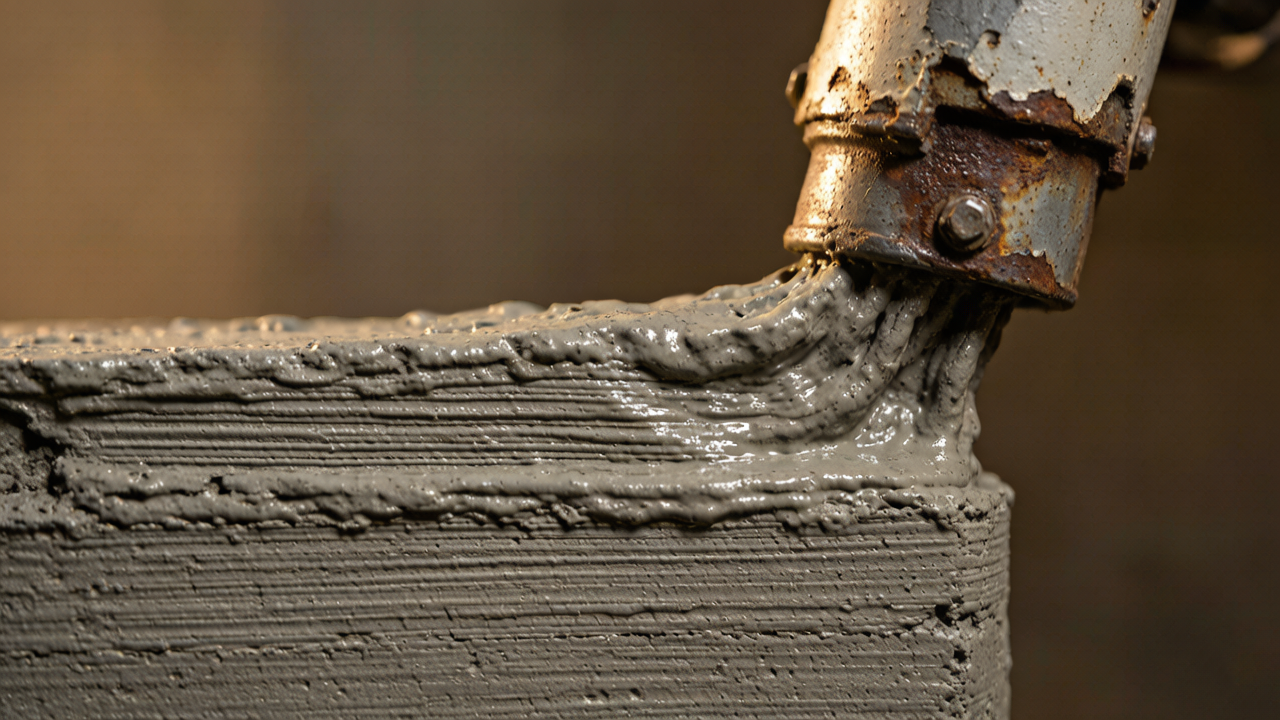
Construction 3D printing has moved from the laboratory to the jobsite. From single-story homes to multi-story commercial complexes, from landscape features to municipal infrastructure, 3D printing is reshaping how the construction industry builds.
But a practical question follows: what happens when a project is too large for a single printer to complete within the contractual deadline?
There is only one answer: parallel operation with multiple printers.
This article breaks down a field-proven multi-printer parallel operation approach for large-scale 3D printing projects across four dimensions: scheduling strategy, site planning, communication & coordination, and quality control.
1. Why Isn’t a Single Printer Enough? Let’s Do the Math
Before diving into solutions, let’s establish a baseline data model.
The theoretical construction cycle of a single‑printer setup for a small single‑story building ranges from 40 to 60 days. But in real projects, you will also face:
Material curing cycles: after printing to a certain height, you must wait for the material to gain strength — layers cannot be stacked endlessly;
Equipment failures and maintenance: nozzle clogs, material supply interruptions, motor overheating — any single failure can halt production;
Weather windows: although 3D printing is faster than conventional construction, high winds, heavy rain, and extreme temperatures still disrupt operations;
Intersecting trades: conventional work such as embedded plumbing and electrical lines and rebar placement must be interleaved with the printing process.
Under these constraints, single-printer serial production typically inflates the schedule to 1.5-2 times the theoretical value. The essence of multi-printer parallel operation is trading space for time and coordination for certainty.
2. Three Core Models of Multi-Printer Parallel Operation
When designing a parallel operation plan, Aiultraprod typically selects one of the following three models — or a combination — based on project characteristics:
Model A: Zone Partitioning
Best for: Single- or multi-story buildings with large floor plans and relatively regular structures.
Core concept: The building footprint is divided into independent zones, with each printer responsible for one zone. Construction joints or post-pour strips are placed between zones.
Advantages:
Printers work independently with no interference — simple scheduling;
A single printer failure does not affect other zones;
Supports mixed fleets of different printer models.
Challenges:
Construction joint treatment requires additional processes;
Structural design must accommodate zoning from the design stage;
Coordinating intersecting trades becomes complex when zones progress at different rates.
Case study: In a commercial building project, Aiultraprod used multiple printers with zone partitioning to cut the structural construction period from 35 days (single printer) to 11 days — a roughly 3.2× efficiency gain.
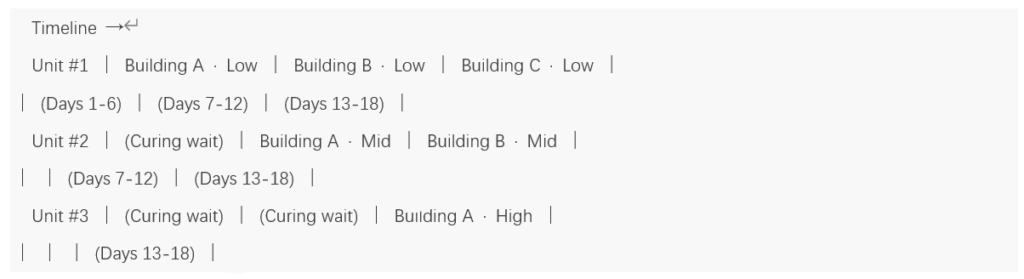
Model B: Pipeline Relay Printing
Best for: High-rise buildings or multi-story projects requiring floor-by-floor printing.
Core concept: Printers divide the work vertically along the building height — Unit A prints floors 1-3 while Unit B prints floors 4-6, and once finished, Unit A relocates to the next building to start floors 1-3 there.
Advantages:
Fully utilizes material curing wait time;
Ideal for batch construction of identical or similar buildings;
Extremely high equipment utilization and excellent return on investment.
Challenges:
Requires highly precise scheduling;
Printers must be capable of rapid relocation;
Demands exceptional project management and on-site coordination.
Case study: In a large cultural-tourism roof component project, Aiultraprod used pipeline relay printing with multiple units to complete all main structures in 3 months — about 4 months ahead of conventional construction.
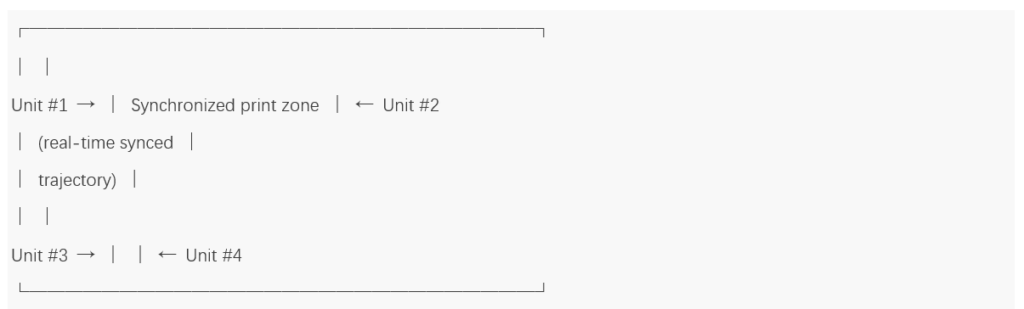
Model C: Synchronized Printing
Best for: Super-large single buildings, irregular structures, or critical sections requiring fully continuous printing.
Core concept: Multiple printers work on the same building simultaneously, synchronizing their motion trajectories through a real-time communication system to avoid collisions and achieve seamless integration.
Advantages:
Maximizes printing continuity and minimizes construction joints;
Enables ultra-wide printing that a single unit cannot achieve;
Better overall structural quality.
Challenges:
Highest technical barrier — requires an in-house collaborative control system;
Real-time communication latency between printers must be kept at the millisecond level;
If one printer fails, the entire synchronized task may be interrupted.
3. Site Planning: It’s Not Just “Adding More Machines”
The second critical challenge of parallel operation is the site. Space is always tight on a construction site.
3.1 Equipment Safety Distance Model
When two 3D printers operate simultaneously, they must maintain sufficient clearance. We determine the minimum safety distance through kinematic envelope analysis:
Same-direction operation: Minimum clearance = maximum printer reach + 1.5 m buffer
Opposite-direction operation: Minimum clearance = reach of Unit A + reach of Unit B + 3 m buffer
Crossing operation: requires staggered timing — simultaneous crossing is not allowed
3.2 Material Flow Planning
Parallel operation means material consumption scales by N×. An easily overlooked issue: if material supply falls behind, the printers stop.
Aiultraprod’s approach:
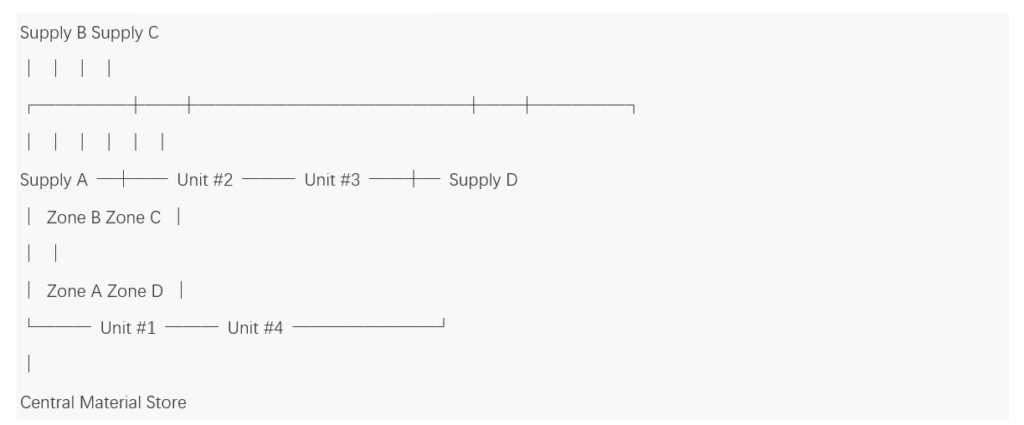
Distributed supply stations: instead of one central mixing plant, a mobile supply unit is placed near every 2-3 printers;
Ring logistics lanes: mixer trucks and supply trucks follow a one-way loop to avoid congestion;
Real-time material level monitoring: every printer is fitted with IoT sensors; when the material level drops below a threshold, a refill request is triggered automatically and the scheduling system re-prioritizes supply.
3.3 Example Site Layout
For example, with 4 printers operating in parallel on a 4,000 m² project, a typical site layout is:
4. Quality Consistency: The Ultimate Challenge of Parallel Operation
If scheduling and site planning are about “getting it done,” quality consistency is about “doing it right.”
Do walls printed by different machines have the same strength? Is interlayer bond consistent? Is surface quality uniform?
These are the questions owners and supervisors care about most — and the key to passing acceptance.
4.1 Unified Process Parameter Standards
Before a project starts, every participating printer must pass a “calibration cube” process:
Each printer uses material from the same batch to print standard test cubes (150 mm × 150 mm × 150 mm);
The cubes are tested for compressive strength, interlayer bond strength, and dimensional accuracy;
Extrusion rate, nozzle height, and travel speed are tuned so that output deviation across all printers stays within ±3%;
Parameters are then locked; only fine-tuning within a preset range is allowed during printing.
4.2 Construction Joint Treatment Standards
Zone-based parallel printing inevitably creates construction joints. Our process standards include:
Stepped interfaces: joints are printed with a stepped (rather than vertical) cross-section to increase the contact area between old and new concrete;
Bonding agent application: a dedicated interfacial bonding agent is brushed onto the joint to ensure the bond strength between old and new material is ≥ 85% of the original material;
Embedded rebar: steel rebar is pre-embedded at horizontal joints to ensure structural integrity;
4.3 Manual Quality Inspection Regime
No matter how advanced the sensors, they cannot replace human judgment. Aiultraprod has established a manual inspection system to ensure every process undergoes “dual human-machine verification.”
Operator self-checks
During printing, each printer’s operator performs a standardized self-check every 2 hours and reports the results item by item via a mobile terminal:
| Check Item | Check Content | Acceptance Criteria |
| Extrusion output | Observe whether the extruded strand is continuous and uniform | No breaks, clumps, or bubbles |
| Interlayer bonding | Visually inspect surface moisture and bonding of the previous layer | Moist glossy surface, no dry powder build-up |
| Geometric accuracy | Measure wall thickness at 3 randomly selected points with a laser distance meter | Deviation ≤ ±5 mm |
| Nozzle cleanliness | Check the nozzle tip for material build-up or hardened residue | Nozzle clean, no signs of clogging |
| Equipment operation | Listen for abnormal sounds and observe whether the motion is smooth | No unusual noise, vibration, or drift |
Self-check results are uploaded in real time and are instantly visible to the project manager and quality inspectors. Any anomaly is immediately logged and flagged: minor issues are resolved on the spot by the operator, while major issues pause the printer and escalate.
5. Boundary Conditions for Parallel Operation
To be fair, parallel operation is not the optimal solution for every project. In the following situations, deploying multiple printers may do more harm than good:
1. Project area < 800 m²: extra printers simply cannot maneuver, increasing collision risk and management complexity. A single printer with optimized process parameters is more practical.
2. Highly complex structures with many irregular curved surfaces: if a building has numerous non-standard surfaces, the programming and calibration costs of synchronized printing can skyrocket, potentially exceeding the schedule benefits of parallel operation.
3. Limited on-site power and logistics: multiple heavy machines running simultaneously multiply the demands on power, material supply, and waste disposal. If site infrastructure cannot keep up, machines can only work in shifts — “parallel” becomes “queuing.”
4. Insufficient team management capability: parallel operation tests not just technology but on-site management. Aiultraprod’s experience: with 4 printers running in parallel, you need at least 1 project manager + 2 crew leaders + 1 operator per printer + 1 quality inspector. Team experience and coordination efficiency directly determine project success.
Decision criteria:
Actual parallel schedule = theoretical single-printer schedule ÷ (number of printers × parallel efficiency factor). If and only if theoretical single-printer schedule ÷ (planned printer count × parallel efficiency factor) > contractual deadline does it mean that parallel operation still cannot deliver on time, and additional printers or schedule adjustments are required; otherwise, the plan is viable. We recommend a parallel efficiency factor of 0.7-0.85 (accounting for management overhead) rather than the ideal 1/N.
6. Looking Ahead: From “Multiple Printers” to “Fleet Intelligence”
What comes after parallel operation? Aiultraprod’s R&D roadmap is advancing on three fronts:
6.1 Heterogeneous Fleet Coordination
Today’s fleets typically consist of identical or similar printer models. In the future, we will introduce “big + small” heterogeneous combinations — heavy-duty printers for main structures and compact printers for details and surface finishing — letting each machine type play to its strengths.
6.2 AI Adaptive Scheduling
Our current scheduling system is based on preset rules and genetic algorithms, but responding to unexpected events (equipment failures, material anomalies) still requires human intervention. In the next phase, we will introduce reinforcement learning so the scheduling system can learn and optimize itself in real-world operation, achieving truly “unattended” autonomous scheduling.
6.3 Digital Twin + Remote Monitoring
By combining BIM and IoT data, we build a real-time digital twin of the project. Project managers can track the location, status, and progress of every printer from a digital twin dashboard — without being on site — and even predict problems that may arise in the next 24 hours.
Conclusion
The gap between “can print” and “can print on time and well” is bridged by a mature multi-printer parallel operation solution.
Aiultraprod’s practice shows that the core of parallel operation is not the number of printers but scheduling capability. An excellent scheduling system + reliable collaborative control + a rigorous quality system — only this combination truly compresses schedules and elevates quality.
For owners and developers choosing a 3D printing contractor, ask one more question: “If the project is delayed, what is your contingency plan?” An experienced, systematic team should give you a data-backed answer.
Aiultraprod — dedicated to end-to-end construction 3D printing solutions. From single printers to fleets, from scheduling to delivery, we drive every printed layer with data.